Advanced Performance &
Load Testing Platform.

Optimize the speed, scalability, and stability of your applications. Manage and analyze your .jmx tests in one place to ensure flawless system performance under real-world traffic.

Digital neon wireframe elephant model representing heavy data load and system robustness in Load Test Lab application.

Product in action

Proof that the message is backed by a real product.

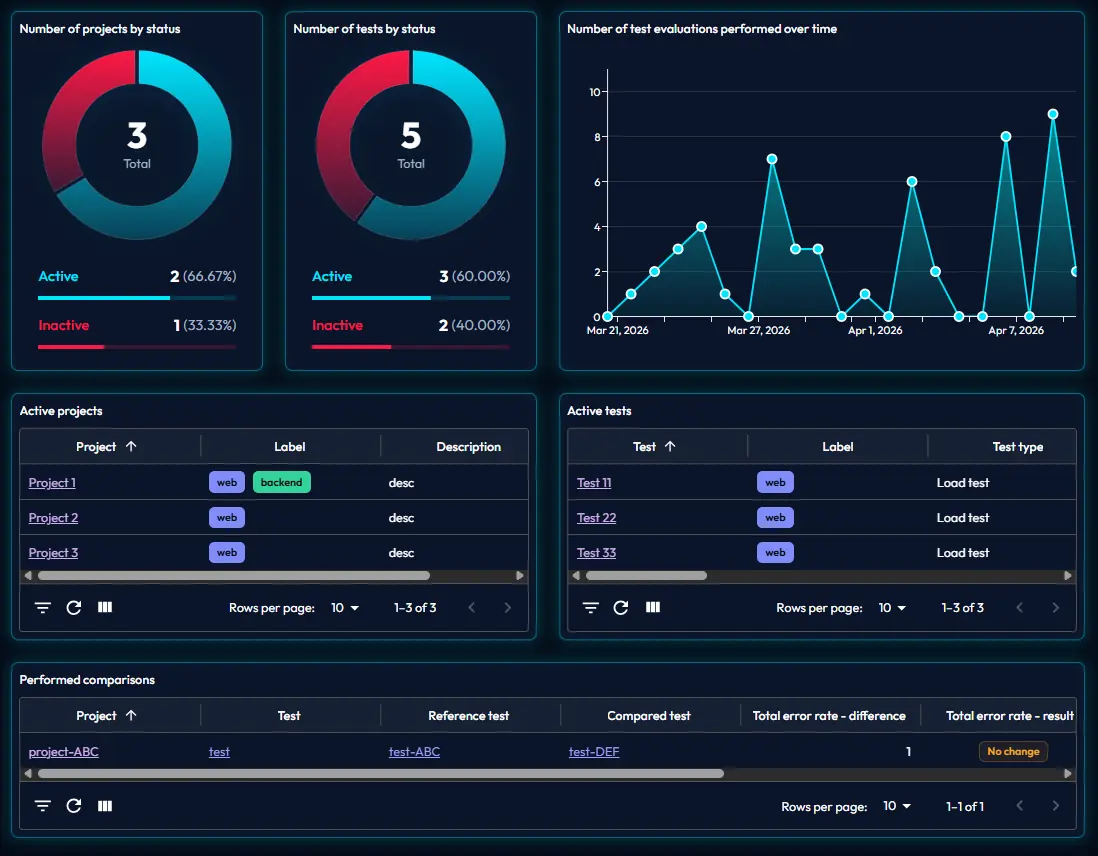
Dashboard Overview

One place for runs, verdicts, and trends.

See the signals that matter without digging through reports or run history.

Read the guide
app.loadtestlab.com / dashboard
Dashboardu screenshot
Test Parameters

Keep execution settings in one place.

Read the guide
app.loadtestlab.com / test-plan

Test parameters

012340 s12 s24 s36 s48 s1 m1m12s1m24s1m36s1m48s2 m2m12s2m24s2m36s2m48s3 mTimeLoad (Users)

Test duration

3 m

Ramp Up

1 m

Peak

2 m

Load (Users)

4

Scheduler

Planned execution, not one-off runs.

The scheduler keeps the rhythm and the test plan adds structure.

Read the guide
app.loadtestlab.com / scheduler
July 2026
Mon
Tue
Wed
Thu
Fri
Sat
Sun
1
21
3
4
53
6
7
82
9
10
115
12
13
141
15
16
174
18
192
20
211
22
23
243
25
262
27
286
29
30
31
Team management

Team management without clutter.

Roles, access, and services stay readable for every team.

Read the guide
app.loadtestlab.com / team

david@loadtestlab.com

Activated

Name

D. Clark

Role

Performance tester

Services

2FA: Yes / Backup: Yes

sophia@loadtestlab.com

Deactivated

Name

S. Miller

Role

Performance tester

Services

2FA: Yes / Backup: Yes

Member

Role

Status

Services

david@loadtestlab.com

D. Clark

Performance tester

Activated

2FA

Backup

sophia@loadtestlab.com

S. Miller

Performance tester

Deactivated

2FA

Backup

1-2 of 12

Criteria

Turn raw numbers into a clear verdict.

Read the guide
app.loadtestlab.com / criteria

Evaluation result

Test Run #1

Maximal total error rate

5 %

Maximal total average response time

150 ms

Result

Success

Test criteria

Maximal total error rate

10 %

Maximal total average response time

200 ms

Maximal test step error rate

5 %

Maximal test step average response time

100 ms

Error tolerance

2 %

Response time tolerance

50 ms

Users

Roles and access in one place.

Read the guide
app.loadtestlab.com / users

Users

#1

Email

maria@loadtestlab.com

Name

M. Carter

Role

Tester

Status

Activated

Users

#2

Email

james@loadtestlab.com

Name

J. Brooks

Role

Tester

Status

Deactivated

Users

Email

Name

Role

Status

maria@loadtestlab.com

M. Carter

Tester

Activated

james@loadtestlab.com

J. Brooks

Tester

Deactivated

Rows per page:

10

1–10 of 1234

Baseline Comparison

Spot regressions before they reach a release.

A reference test gives the team a clear anchor so every new run shows what improved and what got worse.

Read the guide
app.loadtestlab.com / compare

Comparison

#1

Reference test

Home B.

Error rate: 10%

Response time: 12 ms

Compared test

Home R.

Error rate: 10%

Response time: 14 ms

Comparison result

Error rate: 0

No change

Response time: 2 ms

No change

Reference test

Compared test

Comparison result

Name

Maximal total error rate (%)

Maximal total average response time

Name

Maximal total error rate (%)

Maximal total average response time

Diff (%)

Result

Difference

Result

Home B.

10

12 ms

Home R.

10

14 ms

0

No change

2 ms

No change

Check B.

10

12 ms

Check R.

10

14 ms

0

Improvement

2 ms

No change

Login B.

5

8 ms

Login R.

3

7 ms

-2

Improvement

-1 ms

Improvement

Search B.

2

45 ms

Search R.

2

41 ms

0

No change

-4 ms

Improvement

API B.

1

22 ms

API R.

1

19 ms

0

No change

-3 ms

Improvement

Web platform for load testing. Manage your test scenarios, run existing scripts, and automatically analyze system performance.

Core insight

Bring Your Own Infrastructure

Install the Load Test Lab Agent next to your JMeter load generator. Test traffic is generated from infrastructure you control, while execution status, result files, logs, evaluations, and reports are synchronized with Load Test Lab.

  • Customer-controlled load generation
  • Team-specific Agent configuration
  • Centralized result history
  • No managed load cloud required
Read the guide

Core insight

Test your application, not your VPN tunnel.

Run JMeter from a load generator that already has the required network access. Load Test Lab coordinates the workflow without routing generated test traffic through the platform.

  • Local test traffic
  • Existing network access
  • Representative performance signals
  • Centralized execution feedback
Read the guide

Core insight

Start from the scripts you already trust.

Keep JMeter as the execution engine and add the project, ownership, load parameters, criteria, schedule, evaluation, and comparison context around the scripts your team already maintains.

  • Existing .jmx workflow
  • No proprietary scenario format
  • Existing script workflow
  • Shared management context
Read the guide

Core insight

Buy saved time, not virtual-user hours.

Load Test Lab uses monthly or annual subscription access instead of selling a managed load generator by virtual-user hour. You provide the execution capacity and keep platform costs predictable.

  • No platform VUH metering
  • Monthly or annual access
  • Business-outcome focus
  • Your execution capacity
Read the guide
01 / 04

Your new workflow

Create the test in the right context

Project, team, labels, test plan, criteria. Set the context first so every run has clear ownership and stays understandable later.

Projects
Teams
User
Labels
Error rate
Criteria
02 / 04

Your new workflow

Run

Run the test when it matters. The Agent executes the test plan on the load generator, the scheduler keeps the rhythm, and the results flow back into Load Test Lab. Without the Agent, manual import still works.

primary path

The app sends the request, the Agent runs the test, and syncs the results back.

Load Test Lab
Sends the run request
request
sync back
Agent Runs the command line and syncs results back
execute
results
.jmx file
alternative
Manual import Upload an existing result file
03 / 04

Your new workflow

Evaluate against criteria

After the run finishes, the app creates an evaluation. It checks metrics, criteria, and status so the result becomes a clear decision.

23Total

Success

18(78.26%)

In tolerance

4(17.39%)

Failed

1(4.35%)
04 / 04

Your new workflow

Compare, report, move forward

Finally, you compare against a baseline, share the report, and keep the history. The next release then builds on saved context, not gut feeling.

Keep scrolling

Grow without rewriting

Start from your current scripts, not from a new migration.

Prove the value on top of what you already have first. Scale team access, runs, and automation only when it makes sense.

Free Trial
0 € incl. VAT / 30 days

Try without any risk

  • Create test plans
  • View scheduled tests
  • 10-file / 100 MB import quota (trial ends at the limit)
  • × Test execution, team users, or agent management
  • × Notifications, reports, or templates
Start for free
Year plan
256 € incl. VAT / year

The smartest choice for long-term growth

  • Everything in Basic
  • Save 20% compared to monthly
  • Full access to all features
  • One simple annual payment
  • Price locked in for 12 months
Contact us

FAQ

Everything you need to know about Load Test Lab.

During the 30-day trial, you can create test plans, view scheduled tests, and import up to 10 files with a combined size of 100 MB. No payment card is required.
Trial users cannot create team users, start tests through the Agent, configure notifications and reports, manage templates, or create, download, and configure an Agent.
The trial account is deactivated after the limit of 10 imported files or 100 MB in total is exhausted. Activate a paid plan to continue using the account.
Paid access unlocks Agent-based test execution and scheduling, team-user management for team owners, notification and report configuration, file templates, and Agent management. Individual actions still depend on the user's assigned role.
Yes. JMeter remains the execution engine, so your team can keep its .jmx-based workflow instead of rebuilding scenarios in a proprietary test format.
The Agent is a downloadable Java application configured with the local JMeter home directory, a working directory, and team credentials. It receives execution requests and synchronizes result and log files back to Load Test Lab. Agent management is available with a paid plan.
Load generation runs in your infrastructure through JMeter and the Agent; Load Test Lab does not provision a managed load cloud. The management layer is cloud based, and synchronized result files, logs, evaluations, and reports are stored by the platform.
Yes. You can cancel without a cancellation fee and retain paid access until the end of the current billing period.
Contact

Close every release with clarity, not performance guesswork.

LOAD TEST LAB keeps load generation in your infrastructure and securely synchronizes results into a shared process for planning, evaluation, comparison, and reporting.

Your own infrastructure Existing .jmx scripts Faster release decisions
Load Test Lab

Kedros, a.s.

Registered office
Slávičie údolie 106, 811 02 Bratislava, Slovak Republic
IČO
35 893 907
IČ DPH
SK2021854868
Registered
Commercial Register, City Court Bratislava III, Sec. Sa, File 3373/B

Direct contact

Navigate

Legal and GDPR

© Kedros, a.s. — LOAD TEST LAB · All rights reserved.